Hi!
I´ve been testing this new multi emulator for the Android platform on the s5110 device. This emulator it´s in an early development stage and it´s not a valid one for the s5110:
- Virtual on-screen controls must be disable after loading of any game It´s a bit annoying.
- There are no configuration options available for any of the emulators
- The GBA emulator is not as good as GameBoid. It lost frames and the sound is terrible.
At least the RetroArch let´s you use the s5110 hardware keys out-of-the-box ;)
BTW It´s good to have a new emulator in the Android scene!!!
UPDATE: The RetroArch developers are working on a faster GBA core. Great news!
Hi!
In this post I´ll test the available Android GameBoy Advance emulators. The test results may help you to decide which of them to use on your device.
These are the emulators I´m testing:
GBA.emu v1.5.6
GameBoid v2.4.7 (not in the market anymore)
My Boy! - GBA Emulator v1.1.16
VGBA - GameBoy Advance Emulator v3.9.36
The entire tests are done in a JXD s5110 with Android 4.03 stock firmware.
Special characteristics
Each of the emulators has different characteristics that may interest you. The most important are:
GBA.emu v1.5.6
Additional controls: Wiimote, iCP, JS1 but NO sensor
It has a "Benchmark Game" option but I really don´t know how it calculates the results.
It has some display effects
My Boy! - GBA Emulator v1.1.16
Screenshot option menu.
It lets you use the device sensor as a control device
Cheats available
Optionally you can use the GBA BIOS
GameBoid v2.4.7:
Needs the GBA BIOS to run.You can put it (gba_bios.bin) anywhere in your SD Card.
No sound configuration
No video filters available
It lets you use the device sensor as a control device
Cheats available
VGBA - GameBoy Advance Emulator v3.9.36
Many screen filters
May use 3D Hardware acceleration
All the GBA games are being emulating at "maximum" quality (i.e. no frame skip, full screen with correct aspect ratio...) The test´s objective is to discover if the any of the four emulators can play GBA games in the s5110 at 100% full rate. And the tests results are
GameBoid v2.4.7. Not perfect but very very close
My Boy! - GBA Emulator v1.1.16. Lost frames and music isn´t perfect
GBA.emu v1.5.6. Lost more frames and music is even worst than My Boy! emulator
VGBA - GameBoy Advance Emulator v3.9.36. Not working! ¿Configuration problem? ¿Compatibility with s5110 ROM problem?
PD: It´s annoying that a "dead" emulator as the GameBoid (it´s not on development anymore) wins hands down everyone!
These is a WIP list of Android emulators compatibles with the Xperia Play controls.
Arcade
MAME4droid (0.37b5) v1.5.2
MAME4droid Reloaded (0.139) v1.2.1 ( targeted to Dual-Core devices)
Jrioni Arcade Full Version (paid) v3.2.0
Tiger Arcade v4.0.0 Beta (with Ads, Final burn alpha romset)
CPSEmu v1.4 (Capcom CPS2 emulator)
NEO.emu v1.5.6 (Neogeo arcade and home system emulator, romsets from MAME 0.144 or newer)
Final Burn Alpha Android - aFBA v1.6 (support multiple systems, including Cave, Neo Geo, Sega System 16 (and similar), System 18, CPS-1, CPS-2, CPS-3, X-Board, Y-Board, Toaplan, Taito, Psikyo 68EC020 based hardware and misc boards)
Consoles
N64
MupenPlus 64 AE v1.9
Handheld game Consoles Game Boy Advance 1.- GBAoid v2.4.7 (recomended) (¿Development sttoped?) 2.- My Boy! GBA Emulator v1.1.16 3.- GBA.emu v1.5.6 - explusalpha.com
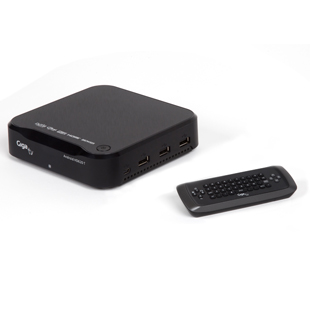
I have the opportunity to test a nice Android 4.0 TDT device: the GigaTV Android HD620 T from tvtech.
I wanted to play some emulators/Android games on it plugging an USB gamepad through any of its 3 USB connectors and watching it on a CRT Sony Trinitron 29".
The idea was to connect the USB gamepad and with a "remapping" program use the gamepad to control emulators and Android games that aren´t programmed to recognize it.
I had two programs to achieve this goal:
- Gamekeyboard 3.1.0
- USB-BT JoyCenter 6.41
I connected my gamepad and the device recognized it automatically. It also let me use the gamepad sticks to move through system menus...cool.
Then I installed Gamekeyboard program and tried to run it. It didn´t detect my USB gamepad. After investigating the problem I realize that this program needs to change the active android input method to a new one added by the Gamekeyboard program.
This new method was unselectable :(...whatever I tried to activate it failed. So without activating this new method the program is useless.
The very same problem happened with USB-BT JoyCenter :(.
So, why can´t I change the Android input method in this device? I still don´t know. This device is pre-rooted so no worries about that.
It´s a pity that I couldn´t get any far as this device seems quite impressive for its low prize.
Hi!
In this post I´ll be reviewing the Champion of the Vectrex Cartridges: Richard Hutchinson´s VecMulti
This cartridge is the most advance at the moment for the Vectrex console. It´s a Micro SD card Vectrex multicart with support for every game available.
VecMulti Package Contents
The unit I bought from Richard it´s a "bare bone" one. He has no cases left so the VecMulti production is momentary stopped till he receives new cases.
My VecMulti consist in a VecMulti board, a 128Mb MicroSD card and a cartridge sticker.
I opened up one of my old original Vectrex cartridges and swapped the original board with VecMulti one. The board fits perfectly on the old case and the process took no longer than 2 minutes.
Then I inserted it on my European late model Vectrex and turn it on. I really was surprised of seeing the VecMulti working in full glory as there are known problems with Vectrex Multicarts and newer Vectrex games running on the Vectrex later models.
After a nice intro, the cart goes into the game selection menu. It consist of a series of 4 games pages. You can move between the different pages using the Vectrex control joystick left and right. You can launch any of the four games in each page with the Vectrex control four buttons.
All the games in the MicroSD card are shown in the menu in an alphabetical order for easy finding.
This menu it´s an easy and relatively fast method of accessing the games stored at the Micro SD.
Installing games
The MicroSD card has two directories:
- Games: where you save your Vectrex games
- Utils: where two utilities are stored (ROM_patcher and VecMulti)
ROM_patcher is a tool for fixing games which conflict with the menu
VecMulti is a file loader for use in developer mode.
In the MicroSD card root there is a utility called "MenuMaker.exe". This little program is used to (re-)create the VecMulti menu.
These are the steps you must follow to install new games on this cartridge:
1.- Copy the new games to the directory: Micro SD card:/Games
Rename the games file extension to ".bin". This step maybe be unnecessary but I haven´t tried "*.vec" file names yet.
2.- Run the program Micro SD card:/MenuMaker.exe
3.- Push button "MAKE"
4.- Wait till it says "FINISHED" and then close the app
5.- Carefully insert the Micro SD card back into the VecMulti cartridge.
6.- Try the new VecMulti Menu you´ve just created.
7.- Technical info. The games are stored in their original format in the Micro SD Card:/games folder. The "MenuMaker" app creates another copy and stores it in the card´s root directory using filenames like "XX.men".
MenuMaker "About" menu
NOTE: MenuMaker executable has been tested on a Windows 7 Ultimate X64 environment.
Technical details.
The board can be connected to USB/Serial for development.
The micro SD card must be formatted in FAT filesystem.
The micro SD card must be less than 2Gb size.
The card socket is a 'push-push' type (i.e. push-click card in, push-click card out).
Games file name should be less than 14 characters or automatically will be trimmed before being displayed on the VecMulti menu system
And now a little video showing the VecMulti cartridge in action
Pros:
Works with all Vectrex games
Nice, easy and fast game menu selection
High quality board
Cons:
This is the "perfect" Multicart solution for the Vectrex system. Really there is no "con" against it. The price tag is high BUT you pay what you get, a high quality product.
Some people should say the cartridge must be open (very easy operation) to access the Micro SD card, but ALL the Vectrex games can be store in any Micro SD card so this operation it´s not going to be very frequent.
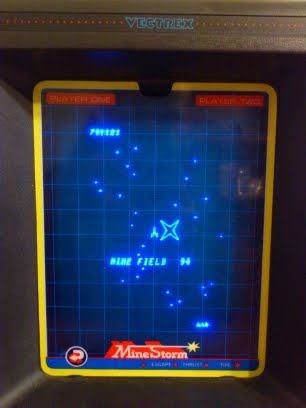
On Sunday 2 of december I broke (again) the world MineStorm Hi-Score with 1.700.121 points (Level 94)
I reached level 94 after 1h 45 min.playing and I couldn´t keep on playing because I was very very tired :(
My objective was to reach level 89 and test if my MineStorm "hangs up" at this level